What do I do if a worksheet is wrong or generation fails?
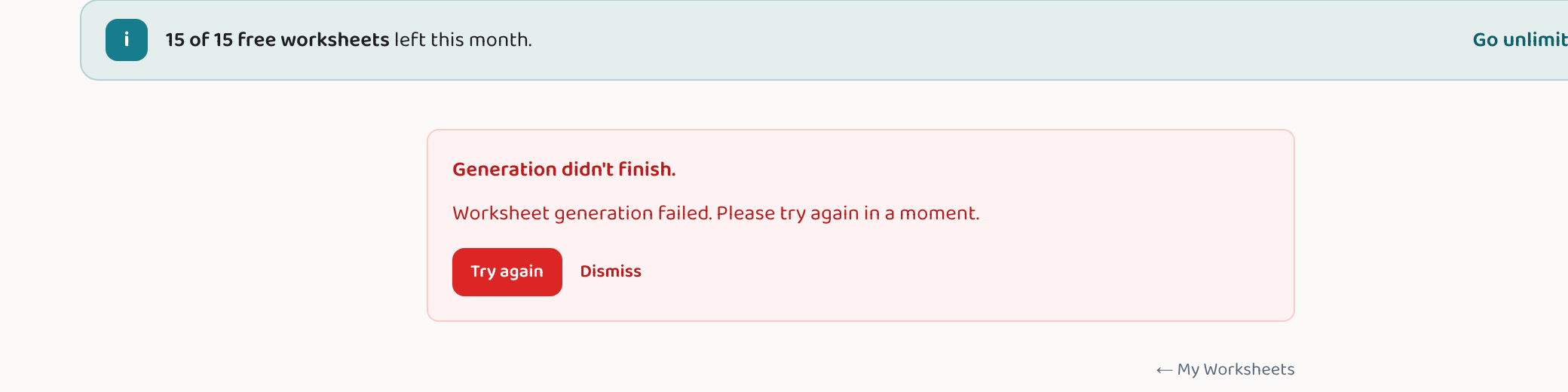
If a worksheet doesn't generate, you'll see an error banner with a "Try again" button — click it to re-run the same request; most hiccups clear on a second attempt, and a failed generation doesn't count against your monthly limit. If the worksheet generates but a question or answer looks wrong, the quickest fix is to generate again for a fresh version (free), or, on a Teacher or Pro plan, edit the question by hand in the block editor. It also helps to describe the topic a little more clearly in the wizard — clearer intent usually produces a cleaner worksheet.
Step by step
If it failed to generate: click "Try again"
A failed generation shows an error banner with a "Try again" button. Click it to re-run the same request — most one-off failures succeed on the second try. A failed attempt doesn't use up one of your monthly worksheets.
If a question looks wrong: generate again
If the worksheet came out but a question or answer seems off, just generate a fresh version. AI output varies slightly each time, and a new attempt usually resolves a one-off mistake — this is free.
Or edit it by hand (Teacher/Pro)
On a Teacher or Pro plan, open the block editor and correct the specific question, answer, or instruction directly — handy when you like the rest of the page and only one item needs a tweak.
Sharpen your description
If results keep missing the mark, rephrase what you're teaching in the wizard to be more specific (e.g. "two-digit subtraction with regrouping" instead of just "subtraction"). Clearer intent produces a cleaner worksheet.
Good to know
- Failed generations are not charged against your monthly limit — you only "spend" a worksheet when one is actually created.
- Because worksheets are AI-generated, a quick read of the page and answer key before use catches the rare mistake — see the guide on trusting the answers.
- If errors persist across several tries, it may be a temporary service issue — wait a moment and try again.
Common questions
Does a failed generation use up one of my worksheets?
No. If a generation fails, it's not counted against your monthly limit — the slot is released, so you can try again without penalty.
A worksheet has a mistake — what's the fastest fix?
Generate it again for a fresh version (free); AI output varies slightly each time and a new attempt usually clears a one-off error. On a paid plan you can also edit the single question by hand.
It keeps failing — is something broken?
Occasional failures are usually a brief hiccup that "Try again" resolves. If it keeps failing across several attempts, it may be a temporary service issue — wait a bit and retry.
Try it yourself, free.
Make a standards-aligned worksheet in under a minute. No credit card to start.
Start free