How do I make worksheets that match what my child is learning in school?
Match by topic: find out what skill your child is working on in class, then either describe that topic in the wizard or pick the matching standard — Lessonpress aligns to the same national frameworks most U.S. schools use (Common Core for Math and ELA, NGSS for Science, and the C3 Framework for Social Studies). The closest match of all is to upload a photo of a worksheet the teacher sent home: Lessonpress reads it and builds fresh practice in the same style on the same skill. One honest note: Lessonpress matches the skill, not your specific school's exact curriculum or pacing — so it lines up by topic and standard, not one-for-one with a particular classroom.
Step by step
Find out what they're working on
Check the topic your child is covering in class — ask the teacher, look at the class syllabus or school portal, or just glance at the homework that comes home. You only need the skill (like "two-digit subtraction" or "main idea"), not an official name.
Describe that topic, or pick the standard
In the wizard, type the topic in your own words and Lessonpress matches it to the right standard — or open the standard picker for your child's grade and choose the one that fits. Both target the same skills schools teach.
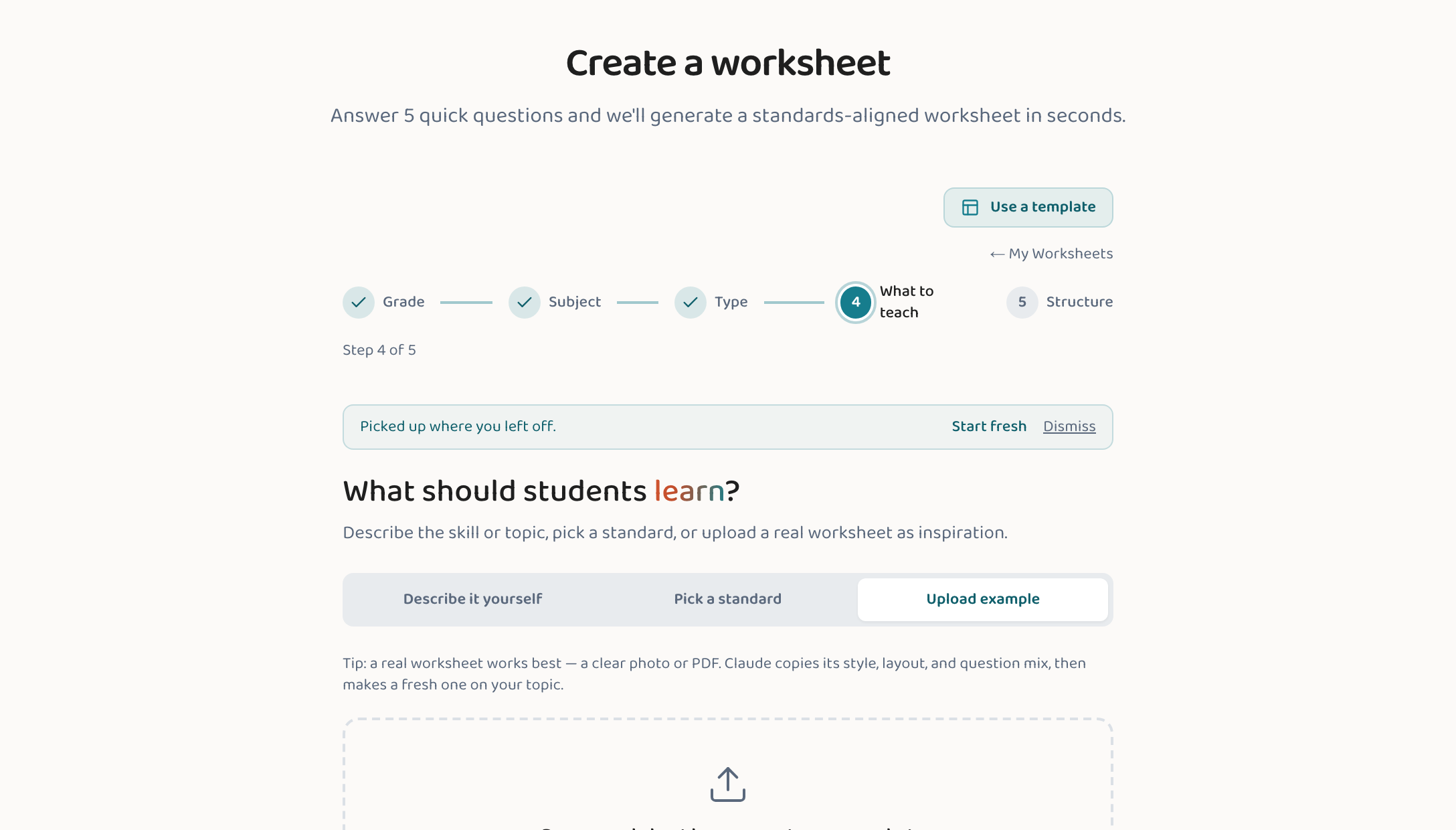
Or upload a worksheet from school (closest match)
Snap a photo or save a PDF of a worksheet the teacher sent home and upload it on the learning-intent step. Lessonpress studies the format and skill and builds fresh practice in the same style — the most literal way to mirror what's happening in class (without copying the original).
Not sure of the topic? Browse the grade
Pick your child's grade and open the standard picker to see what's typically taught at that level. Recognizing a familiar skill there is a quick way to line up with the year's coverage.
Good to know
- Uploading a worksheet from school is the closest match — it mirrors the exact skill and style the teacher is using.
- Lessonpress aligns to Common Core (Math & ELA), NGSS (Science), and the C3 Framework (Social Studies) — the frameworks most U.S. schools build their curriculum on.
- "Matches" means the same skill and standard, not your specific district's pacing guide. If you're unsure a topic is right, a quick note to the teacher confirms it.
Common questions
Will it exactly match my child's class?
It matches the skill and standard your child is working on, and it uses the same national frameworks most schools follow — so it lines up closely by topic. It can't know your specific school's exact curriculum or pacing, though. For the closest possible match, upload a worksheet the teacher sent home and Lessonpress recreates that skill and style.
What if I don't know what they're learning right now?
Look at the homework or graded work coming home, check the school's portal or a class newsletter, or ask the teacher for the current topic or unit. Then describe that topic in the wizard — you don't need the official standard name.
Does Lessonpress use the same standards as my child's school?
It aligns to Common Core (Math and ELA), NGSS (Science), and the C3 Framework (Social Studies) — the widely used U.S. frameworks that most schools' curricula are built on. That's why matching by topic gets you close to what's taught in class.
Try it yourself, free.
Make a standards-aligned worksheet in under a minute. No credit card to start.
Start free