How do I record a test I gave outside Lessonpress?
Open your class, choose "+ Log an outside assessment," pick the single standard the test covered, and score each student on the same grid you use for worksheets. Lessonpress folds those scores into your class progress matrix, the class report, and Class Mastery insights — right alongside the worksheets you made in Lessonpress. It's for any test you gave on paper or in another tool — a quiz, an exit ticket (a quick end-of-lesson check), a unit test — that you want reflected in your class's progress. Logging external assessments is part of the Teacher and Pro plans.
Step by step
Open your class
Open "Students" from the menu and open the class you gave the test to. You'll log the assessment against that class's roster.
Choose "+ Log an outside assessment"
Find the "+ Log an outside assessment" button on the class. This is for a test you gave outside Lessonpress — there's no worksheet to generate.
Pick the standard it covered
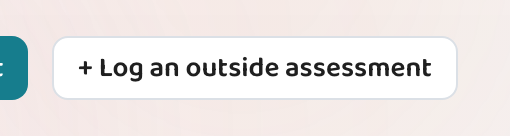
Give it a name you'll recognise later — "Unit 3 Addition Quiz" — then choose the single standard it measured. The name is required: "Log & score" stays greyed out until you type one. Grade and subject are pre-filled from the class, and you can change them.
Score each student
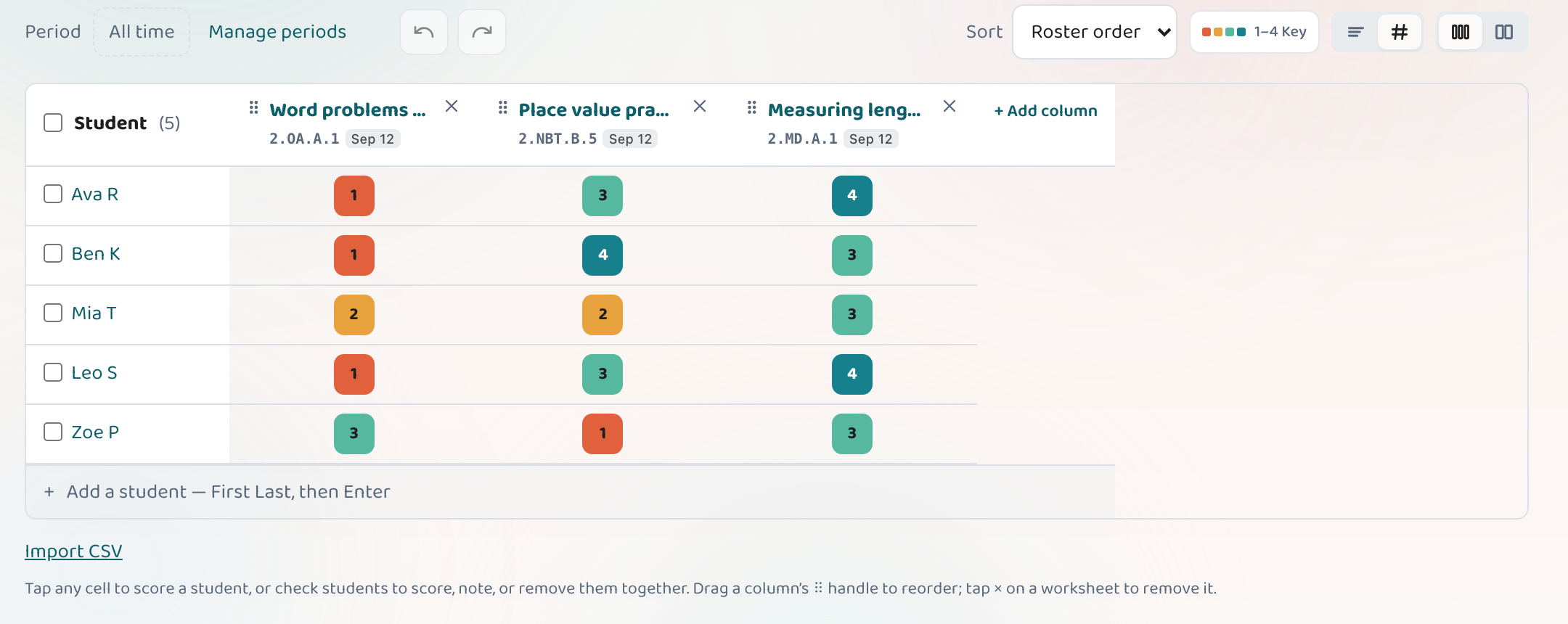
Mark how each student did on the same scoring grid you use for Lessonpress worksheets. These scores are what feed the progress data.
See it in your reports
The scores flow into the class progress matrix, the class report, and Class Mastery insights — sitting right alongside the worksheets you generated in Lessonpress.
Good to know
- It's for tests you scored yourself — a paper quiz, an exit ticket, a unit test from your curriculum — not something Lessonpress generated.
- An external assessment stays out of your worksheet library, so logging one never clutters your saved worksheets.
- Pick the one standard the test mainly measured. If it spanned several, log it once per standard.
Common questions
What counts as an "external" assessment?
Any test or check you gave outside Lessonpress — a paper quiz, an exit ticket, a unit test from your curriculum — that you want reflected in your class's progress. You enter the standard and the scores; there's no worksheet to generate.
Does it show up in my worksheets?
No. An external assessment is deliberately kept out of your worksheet library and the "add a worksheet" picker. It lives only in the class progress matrix and reports, so your library stays clean.
Can I log more than one standard at once?
Today you pick one standard per assessment — the main one it measured. If a test spanned several standards, log it once for each, or score a Lessonpress study set instead.
Who can log external assessments?
It's part of the Teacher and Pro plans, the same as class progress tracking.
Set up your class, free.
Add a class, score a worksheet, and watch mastery fill in by standard. Free 7-day Pro trial — no card to start.
Set up your class